

How LightNet works
LightNet helps a ministry with media distribution, the distribution stage of the content lifecycle. It gives the ministry a way to organize its content in a media library, publish information about each piece of content, and help people find and access it on the internet.
From content to a LightNet site
Section titled “From content to a LightNet site”A media library is a ministry’s organized collection of content. When the ministry uses LightNet to make that collection available online, it becomes a LightNet site. In other words, the media library is the content the ministry organizes, and the LightNet site is the online place where people find and use it.
A LightNet site publishes each piece of content through a media item. The media item contains information about the content, such as its title, description, language, and type, and includes links to the content.
For example, a media item can describe a video, audio recording, image, or document. The content may be uploaded directly to the LightNet site or hosted elsewhere and linked to it, such as a video on YouTube. This allows the ministry to publish different kinds of content in one place.
Languages
Section titled “Languages”LightNet uses language in two different ways. The site language is the language of the LightNet site’s menus, buttons, and other user interface elements. The content language is the language in which a media item’s content is presented. These languages can be different.
For example, a LightNet site might use English for its menus and buttons while offering a video in Czech. English is the site language, and Czech is the content language.
See Languages for more details.
Using the LightNet site
Section titled “Using the LightNet site”People use the LightNet site to browse, search for, and access content:
- The Homepage introduces the LightNet site and highlights selected content to help people discover the media library.
- The Search Page helps people find content by searching and filtering.
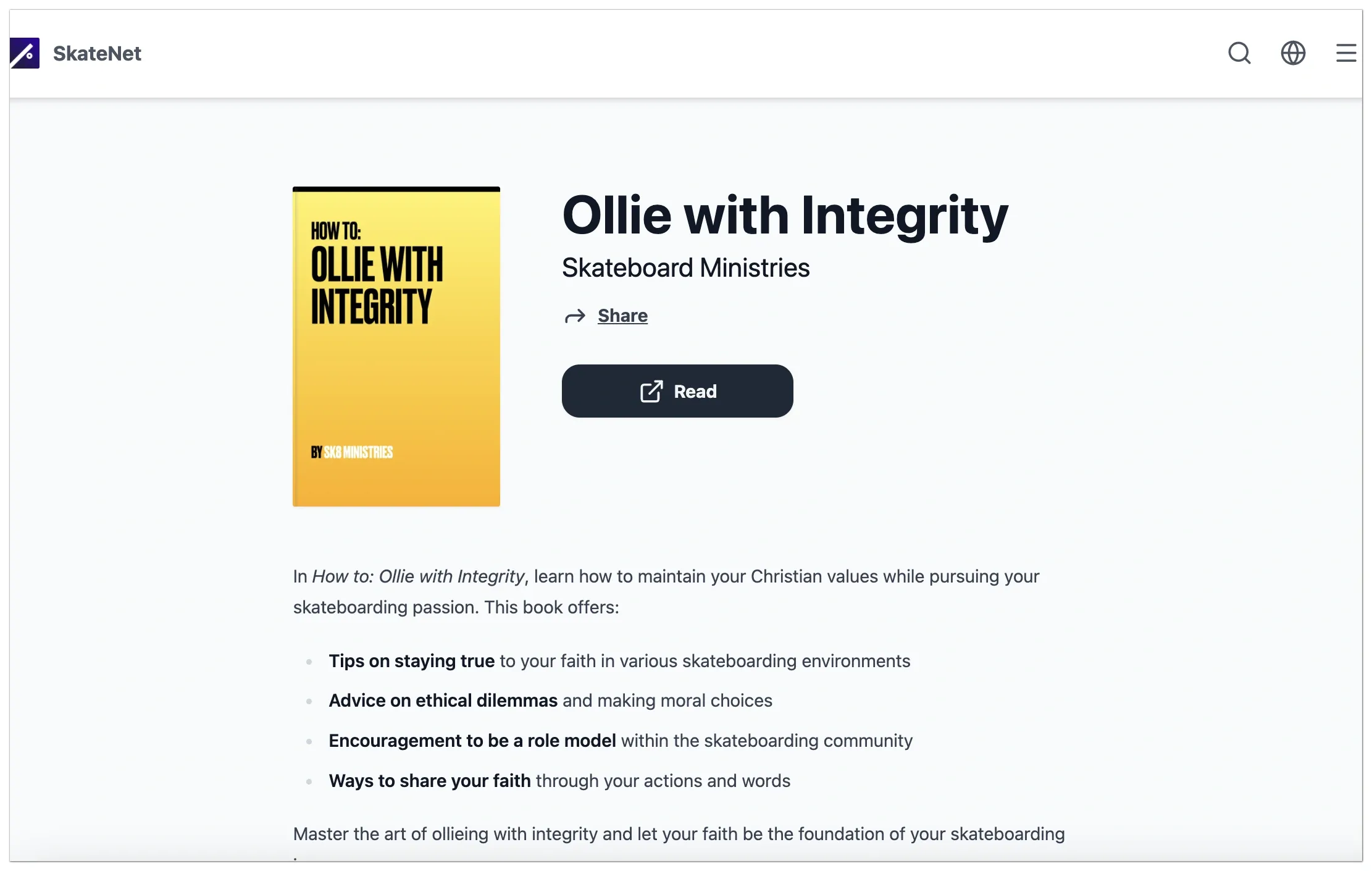
- Each media item has a Media Item Details Page where people can read, listen to, watch, view, open, or download the content, depending on its media type.
The following image shows an example of a Media Item Details Page:
See LightNet site navigation for more details.
Organizing content
Section titled “Organizing content”A ministry can organize its content in several ways, including:
- A media type describes what kind of content a media item represents, such as a video, audio recording, image, or document. A ministry can use format-based names such as Videos or Audio, or ministry-specific names such as Sermons, Books, or Podcasts.
- A category groups related media items by topic. For example, a ministry might use categories such as Bible Studies, Christian Living, or Theology. Categories help people browse and filter content, but do not place it in a particular order.
- A media collection groups related media items into a sequence or set. For example, a ministry might use a media collection for the parts of a sermon series.
- A ministry can publish equivalent versions of a piece of content in different languages. For example, a ministry might translate an English book into French. Each translation becomes its own media item. LightNet groups and links these translations, so people can move between them on the Media Item Details Page.
Hosting the LightNet site
Section titled “Hosting the LightNet site”A site administrator is the software developer who sets up and looks after a LightNet site. They configure the site, arrange its hosting, and keep it running.
A hosting service provides online access to the LightNet site and any content stored with it.
Managing the LightNet site
Section titled “Managing the LightNet site”A content administrator is an editor who manages the content of a LightNet site. The site administrator configures the site and sets up permissions so content administrators can use the Administration User Interface to create, update, and organize media items and media collections.
Analytics
Section titled “Analytics”An analytics service collects information about how people use a LightNet site, such as which pages they visit and which content they access. It is an optional paid subscription add-on. A ministry can decide whether the benefits justify the cost.