

LightNet Site navigation
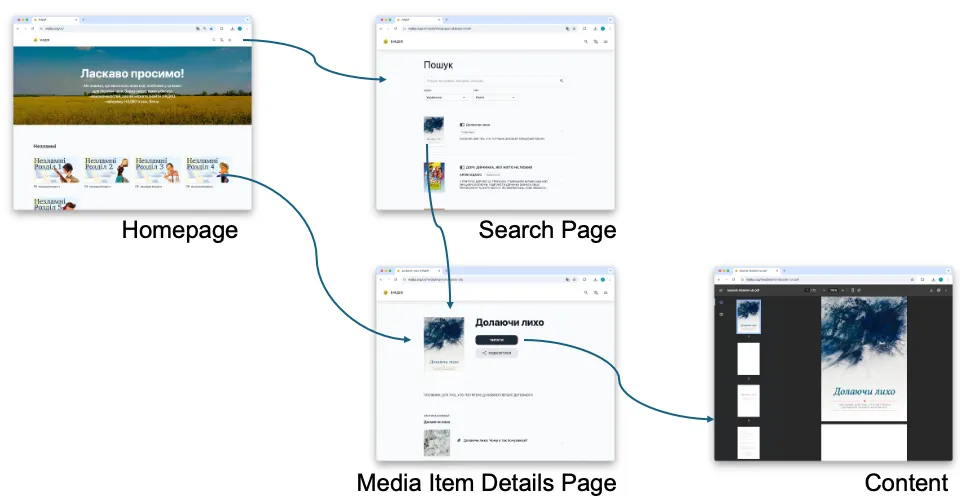
Users access a Ministry’s Content through a LightNet Site in a web browser. LightNet Site navigation includes three main pages, a standard Header Bar, optional Static Pages, and an optional Footer.
Main pages
Section titled “Main pages”The three main pages are the Homepage, Search Page, and Media Item Details Page.
Homepage
Section titled “Homepage”The Homepage is the starting point for a LightNet Site. It introduces the site and helps Users discover the Media Items in it. From the Homepage, a User can go to the Search Page, select a Media Item shown on the Homepage, or open the Main Menu.
Search page
Section titled “Search page”The Search Page helps Users find Media Items in the site’s Media Library. Users can search for Media Items and use filters to narrow the results.
Media Item details page
Section titled “Media Item details page”When a User selects a Media Item on the Homepage or Search Page, the Media Item Details Page opens. It presents information about the Media Item, such as its title and description, and provides access to the Content.
Header bar
Section titled “Header bar”The standard LightNet page layout always includes a Header Bar. Its contents can vary depending on how the LightNet Site is configured.
It contains an optional logo and the site title. It also provides access to the Search Page and the Main Menu. When a LightNet Site supports more than one Site Language, the Header Bar also includes the Language Selection Menu.
Language selection menu
Section titled “Language selection menu”The Language Selection Menu allows Users to choose the Site Language. The Site Language is the language of the site’s user interface, including button labels, menus, and other user interface elements. Changing the Site Language does not change the Content Language. See also Languages.
Main menu
Section titled “Main menu”The Main Menu is a navigation menu that provides access to the Homepage and Search Page. It may also provide access to an About Page and other Static Pages.
Footer
Section titled “Footer”The Footer is optional. A Site Administrator can configure it to include the Language Selection Menu, a short message such as a copyright notice, links to Static Pages or external websites, and a “Powered by LightNet” message.
Static pages
Section titled “Static pages”Static Pages provide additional information for Users of the LightNet Site. A Ministry can use them for any information it wants to make available. They are typically accessed through the Main Menu. In general, a LightNet Site should have only a small number of Static Pages.
About page
Section titled “About page”An About Page is common, although some Ministries may not need one. An About Page can share information about the Ministry or the LightNet Site, or provide contact information.
Examples of LightNet Sites
Section titled “Examples of LightNet Sites”The following sites show different ways Ministries can organize and share their Content with LightNet:
- MediaWorks Digital Library provides media resources in many languages for least-reached people groups.
- Nadija – Hope provides Christian resources in Ukrainian.
- Food for Thought is a collection of articles relating the Bible to a wide variety of topics.